
Availability and shift booking
Turn availability into confirmed bookings.
Bring candidate availability, existing bookings and vacancy matches into one view. Help consultants identify suitable candidates, confirm interest and fill open requirements without gathering information from separate systems.
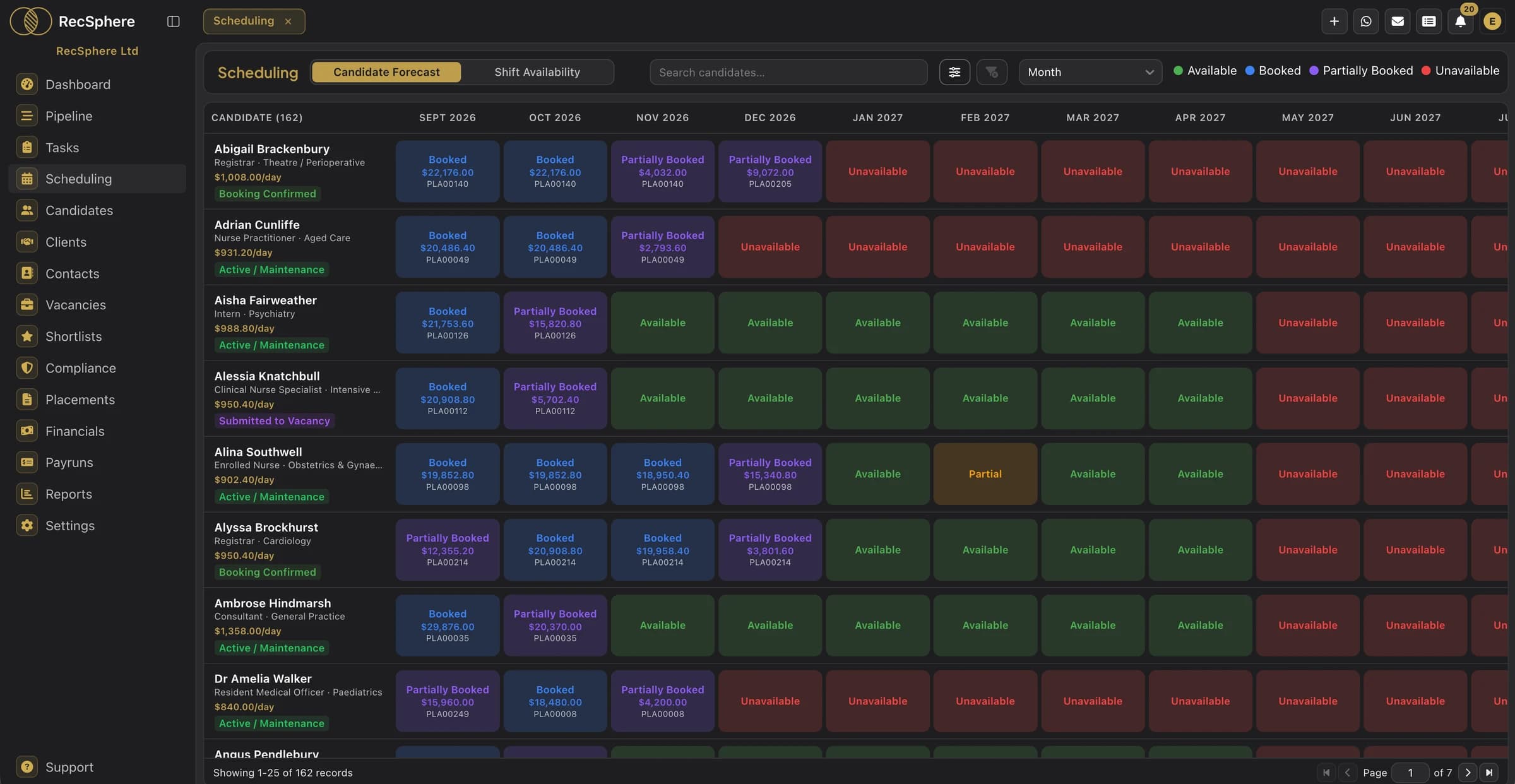
Scheduling
Give consultants a clear view of the work they can fill.
Availability across the months ahead
Review candidate availability and booking patterns over the months ahead. Plan follow-up and identify capacity before requirements become urgent.
Booking from the shift view
Review open shifts alongside candidate availability and use the booking workflow to confirm the placement.
Matching for shift requirements
Review ranked candidate profiles alongside the vacancy. Use experience and recorded availability to identify the people to contact.
Existing commitments in view
Check recorded availability, leave, sickness and bookings before agreeing new work.
Client requests captured
Turn supported emails from known client contacts into structured vacancies with AI Vacancy Capture. Capture dates and flag details that need clarification.
Candidate conversations recorded
Send and receive SMS from RecSphere, with the conversation kept on the candidate's record for colleagues to see.
How it works
From client requirement to confirmed booking.
- 01
Capture demand
Capture supported client requirements with AI or enter the vacancy manually. Confirm the dates and schedule before booking.
- 02
Review availability
Review candidate availability and existing commitments alongside vacancy matches.
- 03
Contact suitable candidates
Contact relevant candidates, confirm their interest and complete the required placement checks.
- 04
Confirm the booking
Complete the booking workflow and carry the agreed details into the contract.
FAQ
Scheduling questions.
What agencies ask us most.
From the candidate's recorded availability and schedule, including existing bookings and recorded absences. Candidates can update availability through their portal, and recruiters can record it on their behalf.
Yes. Candidates who hold the vacancy's grade and speciality are scored on rate, shift availability, location, preferences, margin, skills and experience, with factor weights you control. Review the score alongside availability, compliance and the candidate conversation before booking.
Yes. Two-way SMS lets your team send messages and review replies on the candidate record.
More of the platform
See how RecSphere can help your team fill more bookings.
Explore candidate availability, matching and shift booking in a demo tailored to your agency. See how confirmed work connects to compliance, contracts and financial workflows.